Wednesday, February 16, 2011

sn0wbreeze 2.2 is now out....

,sn0wbreeze 2.2 is now out.

,sn0wbreeze is an application that will allow you to create custom iOS ipsw that you can use to restore any iOS device. sn0wbreeze is the windows counterpart of pwnage tool for mac. sn0wbreeze 2.2 supports 4.2.1 ipsw.

,below is the screenshot of how to create a custom 4.2.1 ipsw..

1. open sn0wbreeze and click on the blue arrow


2.click on browse


3. select your 4.2.1 ipsw


4. now sn0wbreeze will identify your selected 4.2.1 ipsw


5. after sn0wbreeze finished identifying your ipsw, click on the blue arrow


6. now you will be presented with three options, Baseband Preservation mode, Simple Mode, and Expert Mode. The "Baseband Preservation mode" option is the newest option added in this latest version of sn0wbreeze.


7. you can hover above any of the three options to see what each option does as seen on the screenshot below..


8. now for the purpose of this how to i choose "expert mode" and click on the blue arrow. note: you can experiment and choose any of the three options if you want.


9. select general and click the blue arrow


10. if you want to also hacktivate the iphone just leave "Activate the iPhone" option checked. you can also leave the "install animated boot logos" option checked if you want an animated sn0wbreeze logo. you can also enable the "install SSH" option to install SSH in your iPhone. for the purposes of just creating a customized and hacktivated ipsw, i just leave the default checked options and click on the blue arrow


11. now if you want to load custom apps, just select the apps you wanted loaded. otherwise just click the blue arrow


12. now click on "Build IPSW" and click the blue arrow


13. here again you will be presented with another option that is new to the latest version of sn0wbreeze. you can click on "Pacman" if you want to play pacman game while waiting for the sn0wbreeze to finish. otherwise just click on "No,thanks.." option.


14. now let sn0wbreeze to do its thing..


15. here as you can see it is also loading cydia...


16. wait for sn0wbreeze to show this..


17. finished creating customized ipsw. the created ipsw is located on your desktop.


,credits to ih8sn0w for the latest sn0wbreeze..

,you can download sn0wbreeze 2.2 here...


,hope it helps....

Sunday, February 13, 2011

GreenPoison RC6 now live....

GreenPosion RC6 is now live(Windows,Mac,Linux versions). The update fixes the emulator issues and now jailbreaks AppleTV untethered...

below is the twitter announcement of the people involved with GreenPoison..


download GreenPoison RC6 here..

---------------------------------------------------------------------------------------


update!!!!!

GreenPoison RC6.1 is now available..

,this version includes the iBooks fix...

,download here..

Wednesday, February 9, 2011

just another jailbreak reference v2

,this is just an update from my previous blog here.

,screenshot..


,download soft here.

Tuesday, December 21, 2010

samsung galaxy I9000 tutorial...

,i have created a soft/shell which contains some tutorial for samsung galaxy I9000.

,credits to the ff..

eyestrain
samsung-firmware.com
i-thinkbig.blogspot.com(d'odders)
www.gsmsandwich.com.ph
xda forum

,here's the screenshot..


,you can download the soft here.

Saturday, December 18, 2010

JAILBREAK REFERENCE SOFTWARE...

,i have created a soft that will serve as a reference in jailbreaking any iDevice (iPhone 4, 3GS, 3G, 2G and others) based on its version and model..

,below is the screenshot of the said soft...


,full credits to wwww.jailbreakmatrix.com from which i based the soft.

,download the soft here.

Sunday, December 12, 2010

iphone 3GS recovery only solution.....

,this phone came-in to the shop with a "recovery mode" only problem.

,the first thing that i do is to kick it out of recovery using tiny umbrella, result is the same.

,then i restore it using 4.1 firmware with my hosts file pointing to saurik server hoping that its shsh is saved, it came out with error 1604 (as seen from the image below), darn no saved shsh..


,then i try to restore it using 4.2.1 firmware, it came out with error 1015, and the result is still the same. hmmm...maybe this was unlocked before using the update baseband option..

,i check the logs and this is what is shows..


,so my speculation has been confirmed, the baseband has been updated to 6.15 that is why restoring to 4.2.1 ofw still gives me error.

,so to quote the dev team..

WARNING — YOU DO THIS AT YOUR OWN RISK! PLEASE UNDERSTAND THE CONSEQUENCES OF UPDATING TO 06.15.

1.There is no way to come back down from 06.15, and there’s no hiding the baseband version from Apple. You’ll be voiding your warranty in a very obvious way.

2.If some future baseband comes out with a critical fix, you won’t be able to update to it if it remains down in the 05.xx sequence (then again, you wouldn’t update to it if you wanted to keep your unlock anyway).

3.Starting with FW 4.2.1 if you have 06.15 on your iPhone you won’t ever be able to restore to stock firmware (it will fail). You’ll need to only restore to custom IPSWs (then again, if you’re unlocker you should already be doing that).


,so from the number 3 quote above, to solve the problem i need to restore to a custom 4.2.1.

,so here's what i did..

1. download the custom ipsw here.
2. open redsn0w 0.9.6b6.
3. browse to 4.2.1 ofw.
4. check on "just enter pwned DFU right now" and wait for it to finish.
5. open itunes and shift-restore with the custom 4.2.1 ipsw.
6. wait till finish and itunes will not give you any error.

,here's the screenshot of the mobile..


credits..

dev team for the solution..
www.sinfuliphone.com for the custom ipsw..

hope this helps..

Friday, November 19, 2010

how to find the lock code of your nokia N900..

,,actually if you forgot your phones lock code, you have no choice but to reflash it..
,,and after you perform a reflash, still the lock will not be reset to factory default which is 12345, here's a way to find your lock code..

(credits to tmo)..

1. first download john the ripper for windows. (search in google)..
2. you must have rootsh installed on your mobile.
3. in your mobile go to terminal.
4. type sudo gainroot
5. then type..

echo root:$(grep -A 13 lock_code /dev/mtd1|tail -1):

6. it will give you the result like this..

root:63NCRYqE75Us0:

or look at the image below...


7. copy the output and put inside a txt file.
8. download and install your dl'ed john the ripper.
9. inside john the ripper, type this..

john.386 -format:DES -i:digits /path to saved file

10. your unlock code will be the result as seen on the image below..


credits goes to the tmo forum..(talk.maemo.org)

hope this helps...

Saturday, November 13, 2010

almost all NOKIA pinouts...

,i have created a program that will show some (almost all) nokia pinouts...

,i have compiled old and new pinouts available (actually what i have found from www.cpkb.org) from the web.

,say if you want to see the pinout of some old mobile..say 3310..


or some newer mobile such as nokia C5..


,you can find them in my APV viewer..


,credits of course to www.cpkb.org,digital babu for the pinouts..

,if you have newer pinouts that you want included..just leave a comment or contact me.

,my contact details are on the soft..

--------------------------------------------------------------

,software updated...

added nokia 6700slide pinout (6700s)..

download here

Monday, September 6, 2010

How to Flash Samsung Corby B3210 using usb..

,this is tutorial on how to flash your samsung Corby B3210...

files needed..

1.optiflash (download here)
2.Flash file (download here).
3.usb drivers (download Samsung New PC Studio from samsung website for the drivers).


Procedure:

1. put your phone in Download Mode (Press * + # + Power On) and connect to PC. (take note of the com port in Device Manager)
your screen should look like this..


2. Open Optiflash.
3. In Specify Hardware Platform..Choose Customer T:Nox(Intel Sibley 1024/256,USB.
4. In Code: choose the .s3 flash file.
5. In CSC: choose the .csc flash file.
6. In Flash Option: Select Code Binary and CSC Binary
7. In Com Port: choose the same com port as in the Device Manager.
8. Check "Erase all Unused Regions".
9. Click Flash.

flashing screenshot..


10. Wait till finish.

finished flashing screenshot..


this is the finished product.


credits to http://www.samsungfirmwareworld.com/ for the flash file and the flasher.

Tuesday, August 3, 2010

iOS 4 jailbreak tested working....

finally, the jailbreak for iOS 4 that we've been waiting has finally been released...

Comex of DevTeam has finally released a jailbreak tool that will jailbreak all iOS devices. Named JailbreakMe 2.0 aka star is a userland jailbreak that is compatible with the latest firmware of all iOS devices (except the 4.0.1 beta).

For the step by step instructions (video instructions also included) go here.

Now for the hands-on testing..

I follow the guide posted on the website above, but i cant get past the purple screen of death. So if you're stuck on the purple screen of death, here's what you do..

1. Quit Safari.
1. Put your iphone in Airplane Mode.
2. Go to Setting/Safari/Cookies Accept -- Always.
3. Clear cache and cookies.
4. open Safari and type http://jailbreakme.modmyi.com.
5. Slide to jailbreak.
6. Screen will show this. Wait till finish downloading.


7. screen will show this. wait till finish jailbreaking..


8. wait till finish.


9. finished product..


..full credits go to Comex and Dev Team for the jailbreak tool...

Thursday, July 22, 2010

iOS 4.0.1/4.0 jailbreak release may be coming out soon...

,the guy behind spirit, the userland jailbreak tool, is hinting on releasing the newest version of spirit that will jailbreak iOS 4.0 and probably 4.0.1. I maybe speculating but based on his recent tweets below..

I’m not waiting for 4.1 so I hope everyone has SHSH blobs saved. :p


SHSH blobs for 4.0.1 or 4.0 are fine; AFAIK there are no substantive differences except the bars


To be clear: if I don’t run into problems, it will work on 4.0 or 4.0.1. No need to update to 4.0.1. SHSH blobs for either are fine.


who will not speculate?,,,

as to his suggestions of saving your shsh blobs, here is tinyumbrella for windows to save your shsh blobs.

Tuesday, July 13, 2010

how to get out of "align screen" in omnia i900..


,yes i know, this maybe a hardware problem, but if you want to get out of the "align screen" loop on your omnia i900 after you perform a hard reset, this is how did it...


1. you must have active sync installed in your pc.
2. now power-off your phone.
3. connect your usb cable to phone and pc, then power on your mobile.
4. your mobile now will be detected and active synce will activated.
5. this is the important part, open notepad and leave the contents blank.
6. save it as "welcome.not" (without quotes and not as txt file).
7. go to active sync and click explore.
8. copy welcome.not to the mobile main memory.
9. restart phone.

that's it.. you will get past the "align screen".

hope it helps.

credits to samsung-omnia.org, modaco.com

Tuesday, July 6, 2010

jailbreak 3GS new bootrom using snowbreeze update....

this is an update of my previous post here.

Now using sn0wbreeze 1.7 from ih8sn0w.

full details below as given by ih8sn0w...

---------------------------------------------------------------------------------------

THIS TUTORIAL ASSUMES YOU ARE ALREADY ON 3.1.2!
-------
WHAT YOU WILL NEED:

* An iPhone 3G[S] -- new bootrom
* 3.1.2 already installed or 3.1.2 installed via SHSH blobs. <-- Broken blackra1n'd devices will work. (Especially if Spirit messed you up!).
* Payload Pwner-r3 for the 3GS.
* sn0wbreeze V1.7
* iBooty V1.3
* LibUSB (64-Bit users read carefully!!!)
* 3.1.2/4.0 3GS firmware downloaded.
-------
*NOTE : IF YOU HAVE THE SLEEP ISSUE, YOU WILL NEED TO RESTORE BACK TO 3.1.2 FIRST.*

STEP A : Installing LibUSB for iRecovery

Run this mini tool to detect your O/S + Arch. -- Windows + Arch. Detector

*********
WARNING : IF LIBUSB IS NOT INSTALLED PROPERLY, YOUR USB MIGHT NO LONGER WORK!
*********
Windows XP Users download this installer -- LibUSB Installer
*********
Windows Vista/7 users RUNNING 32-Bit:

* Download the installer and run it in compatibility mode for Windows XP.

*********
If you are a 64-Bit user, follow this tutorial -- LibUSB 64-Bit Tut
*********

Once LibUSB is installed iRecovery should be able to function now.
-------
STEP B : Pwning iBEC + iBoot

I : Download this easy tool here -- Payload Pwner-r3 for 3GS // It will help you create the payload + iBEC.

**SAVE THE PAYLOAD + iBEC WHERE iBooty is.**
-------
STEP C : Making a Custom IPSW

I : Download sn0wbreeze V1.7 from here -- sn0wbreeze V1.7

II : USE EXPERT MODE!

III : In General, Checkmark "Disable NOR Flash" <-- THIS IS ESSENTIAL!!!!

IV : Build it. It will be on your Desktop.

**CUSTOM BOOT LOGOS THAT ARE MADE IN sn0wbreeze WILL NOT WORK ON NEW BOOTROMS!**

*Mac Users : PwnageTool does not have this option. I don't think it will ever be in there. Use a Windows Virtual Machine or friends PC to create your firmware.*
-------
STEP D: iBooty Prep.

Most of you know of the utility iBooty that I made for Aki_nG.

It will work as long as you place all of the correct files there.

I : Download iBooty GUI here -- iBooty V1.3 and Extract it.

II : Extract your Custom IPSW created by sn0wbreeze with 7-Zip or another un-archiver.

III : Grab the kernelcache and bring it into the same folder as ibooty.
Aswell as DeviceTree from the folder "Firmware\all_flash\all_flash.n88ap.production\DeviceTree.n88ap"

IV :
* Rename your Kernel 4.0-Custom to "kernel.40"
* Rename your iBEC 4.0-Custom to "ibec.40"
* Rename your DeviceTree 4.0-Custom to "devtree.40"
======
Your folder should look like this :

- iboot.payload <-- Created with Payload Pwner.
- devtree.40 <-- Grabbed from Custom IPSW made by sn0wbreeze.
- ibec.40 <-- Created with Payload Pwner.
- irecovery.exe <-- Comes with iBooty.
- readline5.dll <-- Comes with iBooty.
- iBooty.exe <-- Comes with iBooty.
- kernel.40 <-- Grab from Custom IPSW made by sn0wbreeze.
- sn0w.img3 <-- Comes with iBooty.
- wait.img3 <-- Comes with iBooty.
======
-------
STEP E: Restoring to 4.0 + Booting
-------
*MAKE SURE YOU ARE ON 3.1.2 WHEN DOING THIS*

I : Run iBooty and Select "Prepare Device for Custom Firmware". Run the Process and if you see the image, you can proceed!

II : Now open iTunes and restore to the custom ipsw.

***WHEN DONE, YOUR DEVICE WILL GO INTO RECOVERY MODE. IT WONT BOOT.***
-------
STEP F : Booting

I : Just Re-Run iBooty and select "Boot It". If all goes well it will boot!
-------
Enjoy!
-------
Hopefully I can get a tool out there that will make all of this much easier. Of course, that only happens when I get bored from ppl msging me on Twitter =p
============
CREDITS:
============
* iPhone Dev-Team (Borrowed the iBoot payload from them =])
* msft.Guy (Helping out here and there.)
* AKi_nG (For testing everything!)
* posixninja (For his continuous help!!!)


credits to

iH8sn0w
Developer of iREB/sn0wbreeze


original source..

Sunday, July 4, 2010

Jailbreak iOS 4 on iPhone 3GS (New Bootrom).....

yep..iOS 4 on iPhone 3GS with new bootrom can now be jailbroken..but there's a catch and a procedure..full details below..

credits to ih8sn0w...

-------------------------------------------------------------------------------------
Pwning 4.0 on New Bootrom 3G[S] w/3.1.2 SHSH Blobs
I wrote this all on the road with my iPad, so sorry if there is any major Grammar errors. If anyone points out any errors, I'll fix it up. Anyways...
-------
I figured making a tool would take a bit too long. So, i'm going to write up this tutorial. It isn't recommended for regular users.

**BEFORE PROCEEDING, ENSURE THAT YOU HAVE YOUR PHONE BACKED UP!**
-------
WHAT YOU WILL NEED:

* An iPhone 3G[S] -- new bootrom
* 3.1.2 SHSH blobs.
* difrnt's iBSS grabber
* Payload Pwner-r2 for the 3GS.
* sn0wbreeze V1.6.2
* iBooty
* LibUSB (64-Bit users read carefully!!!)
* 3.1.2/4.0 3GS firmware downloaded.
-------
STEP A : Grabbing your 3.1.2 iBSS file.

Pointing your hosts :

I : If you have your shsh blobs saved on Cydia/Saurik's server then follow this tutorial. -- http://saurik.com/id/12

II : If you have it saved with TinyUmbrella, then download the GUI here. -- http://thefirmwareumbrella.blogspot.com/
-------
Restoring to grab the iBSS file.

I : Place your device in DFU.

II : Start up the iBSS/iBEC grabber.

III : Put the save folder on a new folder on your desktop.

IV : Hit "Start Monitoring".

V : Now go back to iTunes and do SHIFT + Restore. Then browse for your 3.1.2 IPSW. You will need to restore
to 3.1.2 in order to pwn 4.0.
-------
Saving your iBSS

I : After Restoring, Go to the folder that you have specified to save your iBSS file.

II : You will see folders like (Per**.tmp). Go into one of them, and you'll see a folder called "Firmware". Go there. Then go to the folder "dfu".

III : Copy the iBSS file to a safe place, then you can remove the folder created by the iBSS Grabber.
------
STEP B : Creating custom 4.0 firmware.

I : Download sn0wbreeze from http://ih8sn0w.com and create your custom 4.0 ipsw.

*Ignore the warnings after browsing for the ipsw.*
------
STEP C : Installing LibUSB for iRecovery

Run this mini tool to detect your O/S + Arch. -- Windows + Arch. Detector

*********
WARNING : IF LIBUSB IS NOT INSTALLED PROPERLY, YOUR USB MIGHT NO LONGER WORK!
*********
Windows XP Users download this installer -- LibUSB Installer
*********
Windows Vista/7 users RUNNING 32-Bit:

* Download the installer and run it in compatibility mode for Windows XP.

*********
If you are a 64-Bit user, follow this tutorial -- LibUSB 64-Bit Tut
*********

Once LibUSB is installed iRecovery should be able to function now.
-------
STEP D : Pwning iBSS + iBoot

I : Download this easy tool here -- Payload Pwner-r2 for 3GS // It will help you create the payloads.

**SAVE THE PAYLOADS WHERE iBooty is.**
-------
STEP E: iBooty Prep.

Most of you know of the utility "iBooty" that I made for Aki_nG.

It will work as long as you place all of the correct files there.

I : Download iBooty GUI here -- iBooty for 3GS and Extract it.

II : Extract your Custom IPSW created by sn0wbreeze with 7-Zip or another un-archiver.

III : Grab the kernelcache and bring it into the same folder as ibooty.
Also grab the iBEC from the folder "Firmware\dfu\iBEC.n88ap.RELEASE.dfu"

IV :
* Rename your iBSS 3.1.2 signed to "ibss312.dfu"
* Rename your Kernel 4.0-Custom to "kernel.40"
* Rename your iBEC 4.0-Custom to "ibec40.dfu"
======
Your folder should look like this :

- iboot.payload <-- Created with Payload Pwner.
- exploitibss312 <-- Created with Payload Pwner.
- ibec40.dfu <-- Grabbed from Custom IPSW made by sn0wbreeze.
- irecovery.exe <-- Comes with iBooty.
- readline5.dll <-- Comes with iBooty.
- iBooty.exe <-- Comes with iBooty.
- ibss312.dfu <-- THIS NEEDS TO BE YOUR iBSS from the restore!
- kernel.40 <-- Grab from Custom IPSW made by sn0wbreeze.
- sn0w.img3 <-- Comes with iBooty.
======
-------
STEP F: Restoring to 4.0 + Booting
-------
*MAKE SURE YOU ARE ON 3.1.2 WHEN DOING THIS*

I : Run iBooty and Select "Prepare Device for Custom Firmware". Run the Process and if you see a snow flake, you can proceed!

II : Now open iTunes and restore to the custom ipsw.

***WHEN DONE, YOUR DEVICE WILL HAVE A BLACK SCREEN AND NOT BOOT! ITS IN A DFU LOOP [THIS IS NORMAL!]***
-------
STEP G : Booting

I : Just Re-Run iBooty and select "Boot It". If all goes well it will boot!
-------
Enjoy!
-------
Hopefully I can get a tool out there that will make all of this much easier. Of course, that only happens when I get bored from ppl msging me on Twitter =p
============
CREDITS:
============
* iPhone Dev-Team (Borrowed the iBoot payload from them =])
* msft.Guy (Helping out here and there.)
* AKi_nG (For being the first to test this)
* difrnt (For iBSS Grabber)
* posixninja (For his continuous help!!!)


original source

Thursday, June 17, 2010

upgrade iphone 3Gs to 3.1.3 without upgrading baseband

here is the procedure on how to upgrade your iPhone 3Gs 3.1.2 with baseband 5.11 to 3.1.3 without upgrading the baseband.

1. first make a modified 3.1.3 ipsw using the instructions provided here.
2. shift-restore on your itunes and use the modified firmware that you created.
3. you will come up with error 6 on itunes as shown by the image below.


3a. then you phone will be in recovery mode as shown.


4. now open ireb and press fix recovery loop, then choose iphone 3Gs.


5. Now your phone will be back to normal as shown below.


6. here's the screenshot of the phone with 3.1.3 version and 5.11 baseband.


download ireb here.

Monday, June 14, 2010

Blacksn0w RC2 Unlock for iOS 4 is now out...

yep, you read it right, iOS4 can now be unlocked using Blacksn0w RC2.

but wait..there's a catch..only for 5.11 baseband..

the guy who released PushFix 2.0 for unlock 3.1.3 3GS and who released the Blacksn0w RC2 fix for 3.1.3 did it again..

read full story below..

--------------------------------------------------------------------------------------


Steve, the guy who was behind PushFix 2.0 (the first real fix for Push Notifications) for unlocked iPhones and Blacksn0w RC2 fix for iPhone 3.1.3 has just released Blacksn0w RC2 for iOS 4. This version of blacksn0w is basically a repackaged version of the original unlock released by geohot, and the binaries which were recently released by MSFT Guy for 05.11.07 baseband on iPhone 3GS, running iOS 4.0 GM (formerly iPhone OS 4).


The official description of the package is as follows.

Use on Modem Firmware 05.11.07 ONLY!

V1.2: Support for 4.0 GM. Backwards compatible to 3.1.2/3 as well. V1.1: MyWi tethering fix

Geohot’s unlock for 3.1.2/3.1.3/4.0GM on the iPhone 3GS (and probably 3G). Please donate at http://blackra1n.com/ if you enjoy.

With 3.1.3 & 4.0 GM patch (when needed) by msft.guy. Packaged by Pushfix.info

This is an unofficial release but Geohot HAS given me permission to redistribute blacksn0w. All known issues with WiFi loss and boot loops seem to be fixed. If it doesn’t work for some reason, you should still get the SpringBoard. This allows you to uninstall if necessary. It is a little slower to boot because of the increased safety of the release. A 3GS boots to cell connection established in about 90 seconds in iOS 4 now (50% slower than 3.1.X).

Improvements may be made in the future.


If all those manual instructions were too hard for you to follow, you can now simply use this Blacksn0w RC2 package to get the job done. Simply follow the simple step by step guide below to unlock your iPhone 3GS on iOS 4, 05.11.07 baseband using blacksn0w RC2.

Warning Note: I have tested it and it is working. This is strictly for iPhone 3GS, with old bootrom and 05.11.07 baseband only. Also the Blacksn0w binaries are a little buggy, which will result in your phone taking at least 90 seconds on every reboot to catch carrier signals. Proceed only if you are an advanced user. Otherwise, wait for the official unlock and jailbreak tools which will be out in about two weeks time. We are not responsible if you end up bricking or locking your phone.

How to: Jailbreak iPhone 3GS on iOS 4:
Step 1: Follow the complete guide posted here to jailbreak your iPhone 3GS using PwnageTool bundles on iPhone firmware 4.0.

How to: Unlock iPhone 3GS 05.11.07 Baseband on iOS 4:
Step 2: Once you are done with the jailbreak, you can now unlock your iPhone 3GS running custom iOS 4.0 firmware by using blacksn0w RC2 from Cydia. To do this:

Start “Cydia” on your iPhone.

Touch on “Manage” tab on the bottom.

Now touch on “Sources” as seen in the screenshot below:


Touch on “Edit” and then on “Add”. You will be prompted to enter a url source as seen in the screenshot below. Type “http://cydia.pushfix.info” and touch on “Add Source”.
Cydia will now automatically update your sources by following a series of automated steps.

After installation is completed. Search for “blacksn0w RC2 for iOS 4” in Cydia and install this application. This app will automatically unlock your iPhone 3GS so that you can use it with any carrier.


Step 3: Now simply restart your iPhone. Wait for at least 90 seconds for your phone to catch signals and voila! you should now have a fully unlocked iPhone 3GS, on iOS 4. [Thanks Steve!]


credits to original author here.

Monday, June 7, 2010

iPhone 4.0 and iPhone 3.1.3 Unlock Release Confirmed for this Month

Here we go. The waiting will finally be over.

It is now confirmed by a member of the iPhone Dev Team that full carrier unlock for iPhone OS 3.1.3 and 4.0 will be available this month.

check out the details below.

----------------------------------------------------------------------------------

We have been hearing about this one aren’t we? but what we have now is final confirmation. According to the member of iPhone Dev Team, full carrier unlocks for iPhone OS 3.1.3, and iPhone OS 4.0 will be released this month once Apple has released both the final version of iPhone OS 4, and the next iPhone 4G / HD.


People still ask, but sure, with both 4.0 & iPhoneHD coming out this month, so too will the 3.1.3/4.0 carrier unlocks


----------------------------------------------------------------------------


source

Thursday, June 3, 2010

camera not saving pictures in iphone solution...

problem: when you use the camera of iphone, the pictures are not saved....

solution:

requirement.

1. you must have a jailbroken iphone.
2. you must have openssh installed in your iphone.
3. you must have afc2add installed.
4. you must have diskaid installed on your pc.

instructions:

1. connect your jailbroken phone to pc.
2. open diskaid.
3. click root.
4. browse to /var/mobile/DCIM.
5. delete the folders inside.
6. done.


hope it helps..

Tuesday, June 1, 2010

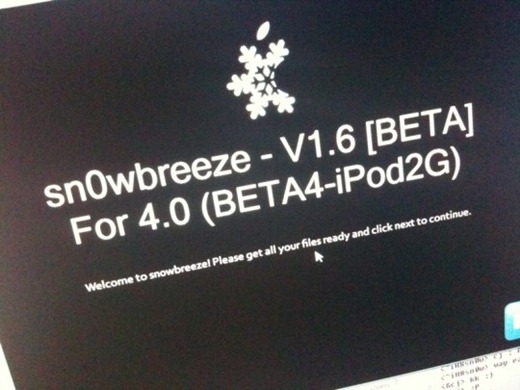
Sn0wbreeze V1.6 to Jailbreak iPhone OS 4.0

The iPhone hacker behind sn0wbreeze, f0recast and BlackBreeze today accidently put up a picture on his twitter account, showing version 1.6 of sn0wbreeze which promises to jailbreak iPod touch 2G on iPhone OS 4. The picture in question was removed quickly but the folks at The Technopath were quick enough to grab the image for everyone to see.


While there is no ETA (Estimated Time of Arrival) on the release yet, but there is no reason why it shouldn’t be soon as iPhone OS 4 is set for June 7 release at WWDC where Apple is also expected to announce the next iPhone.


original source here

Sunday, May 30, 2010

unlock for 5.12 baseband 3.1.3 iphone coming in june

it seems that the unlock for iphone 3.1.3 with baseband 5.12 will soon be coming out...

below are the details:

While replying to a tweet, MuscleNerd of iPhone Dev Team has confirmed that an unlock for iPhone 3G/3GS on 05.12.01 baseband will be released once Apple announces the new iPhone along with final GM version of iPhone OS 4. This announcement is expected to be made at WWDC 2010 so it wont be long before we finally get our iPhones unlocked on this baseband.

The said conversation between MuscleNerd and EmmanueGT is as follows.

@MuscleNerd will there be a unlock software coming out for the 3gs 3.1.3 baseband 05.12.01 when the new iPhone 4g comes out??

@EmmanueGT yep..so don’t sell or give away your 3GS :) (at same time, remember not to accept Apple FW upgrades in future)


------------------------------------------------------------------

it seems that the unlock is imminent...

original source